How to make a DIY poster at home
Most DIY poster tutorials start at the print dialog. By then the decisive choices are already behind you: the size you designed at and the pixels you exported determine whether the finished poster looks crisp in a frame or soft and blocky on the wall. This guide runs the project in the right order — frame first, resolution second, design third, printing last.
Pick the frame first, work out the pixels the size needs second, design third, and print last; that order is what keeps a DIY poster crisp.
On this page
Pick the frame before you open a design app
Off-the-shelf frames come in a short list of sizes, and three of them cover almost every wall: 12×18, 18×24, and 24×36 inches. A standard-size frame costs $10–25 at any big-box store. Design at an odd size like 20×28 and you are suddenly shopping for custom framing, which starts around $80 — more than the frame-plus-poster combined at a standard size. Nothing about your artwork improves at 20×28.
A useful bonus: 12×18 and 24×36 share the same 2:3 aspect ratio, so one design file can serve both sizes. 18×24 is 3:4 — closer to square — which suits centered, symmetrical layouts better than wide scenic ones.
Set your canvas to print pixels on day one
Printed size in inches × DPI = pixels needed. That one multiplication, done before you place a single element, prevents the most common DIY poster failure: a design built at screen resolution that falls apart when enlarged. Here are the numbers for the three standard frames:
| Frame size | Canvas at 150 DPI | Canvas at 300 DPI |
|---|---|---|
| 12×18 in | 1800 × 2700 px | 3600 × 5400 px |
| 18×24 in | 2700 × 3600 px | 5400 × 7200 px |
| 24×36 in | 3600 × 5400 px | 7200 × 10800 px |
Which column? 150 DPI is genuinely fine for a poster viewed from three feet or more — that is how posters are viewed. Go for the 300 column only if the design has fine print people will read from arm's length. When you later load the file into the splitter, its live readout confirms where you landed: the effective-DPI badge shows green at 200 and up, amber at 100–199, red below 100. The quality presets top out at your source resolution, so no setting will invent detail you didn't export.
Where to design it
- Canva: choose “Custom size,” enter the pixel dimensions from the table, and download as PNG. The free tier allows custom pixel sizes; skip the “size to fit” suggestions.
- Figma: set a frame to the exact pixel dimensions and export PNG at 1×. Resist the habit of designing small and exporting at 2× — text metrics and stroke weights shift.
- Photoshop: create the document in inches with resolution set to 150 or 300 ppi, then File → Export → PNG.
- GIMP: set the image size in pixels at creation, flatten before export, export as PNG.
One rule spans all four: export PNG, not JPEG. JPEG compression leaves faint halos around hard edges and banding in flat color fields — precisely the elements posters are built from. A 7200×10800 PNG might be 40–80 MB; that is normal, and the splitter handles it in the browser without uploading it anywhere.
Design choices that survive tiling
Your artwork will be cut into Letter-size tiles and rejoined, so a few design decisions pay off at assembly time:
- Keep hairlines away from seam zones. A stroke thinner than about 2 pt that crosses a tile boundary will advertise any half-millimeter of misalignment. Thick strokes, photos, and organic shapes absorb small errors invisibly. You can see roughly where seams will fall by dividing your design into a 3×4 grid for a 24×36 on Letter paper.
- Test contrast at distance. Zoom out until the design is about two inches tall on screen — that approximates the poster from across a room. If the headline vanishes, it will vanish on the wall too.
- Skip the bleed. Commercial printers need 3 mm of bleed for trimming; a tiled poster does not, because the splitter's margin setting (0 to 1 inch) manages the page edges for you. Design exactly to your final dimensions.
- Big flat color fields show seams the most. Texture, gradients with grain, and photographic backgrounds hide joints far better than a solid 40-inch expanse of teal.
Print and assemble, condensed
- Upload the exported PNG at Free Image Splitter.
- Choose your paper size and orientation — Letter or A4 for most home printers.
- Set 0.25 in of overlap so each tile repeats a strip of its neighbor, with printed cut guides.
- Export the multi-page PDF and print at 100% scale (“Actual size” — never fit-to-page).
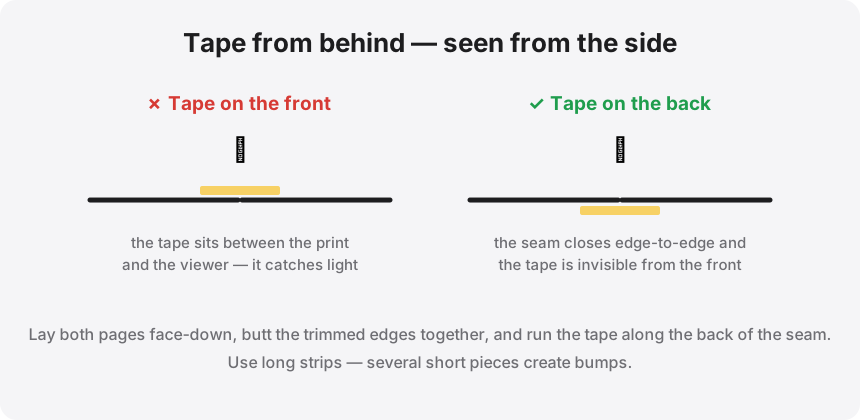
- Trim the interior edges along the guides and tape the sheets from the back.
If this is your first tile job, the full splitting tutorial walks through every control, and the printer-settings guide covers the scale and quality options that vary by printer brand.
Finishing: from taped sheets to wall
Three ways to finish, in ascending order of polish. Adhesive putty or removable strips work for a temporary hang and cost nearly nothing. Foam board — 3/16 in, about $4 a sheet — plus spray adhesive turns the taped pages into a rigid panel that hangs flat and survives being moved. The frame is the interesting choice: glass presses every tile flat against the backing and makes seams noticeably harder to spot, at the cost of some glare; frameless or open-frame mounting avoids the glare but leaves paper texture and joints more visible. Matte paper pairs best with glass — the paper guide has the full comparison.
Your design is done — get it on paper
Drop in the PNG you just exported, pick your printer's paper size, and download the tile grid with cut guides. Your artwork stays on your computer the whole time.