How to print a poster at home without a large-format printer
A wide-format printer that can produce a real 24×36 poster starts around $2,000 and passes $4,000 once you add roll paper and ink. A single 24×36 print from a shop runs $25–60. Printing that same poster as tiles on the machine already sitting on your desk costs about $2 in paper and ink. This article is about that gap — including the cases where the $25 shop print is still the smarter buy.
Tiling a poster onto Letter or A4 pages on the printer you already own costs about $2, against $25–60 for a single shop print or $2,000 and up for a wide-format printer.
On this page
Three ways to get a big poster
Every large-poster path comes down to one of three options. Here is how they stack up for a 24×36, the most common size in this range:
| Method | Cost for a 24×36 | Turnaround | Quality ceiling | Effort |
|---|---|---|---|---|
| Local print shop | $25–60 | Same day to 2 days | Excellent — continuous photographic output on wide stock | One trip, sometimes two |
| Online print service | $10–30 plus shipping | 3–7 days | Very good, varies by vendor | Upload, then wait for the mail |
| Tile it at home | About $2 in ink and paper | 20–30 minutes | Good — sharp at viewing distance, seams visible up close | Print 12 pages, trim, tape |
The home option wins on price by an order of magnitude and on speed by days. What it gives up is the continuous surface: a tiled 24×36 is a dozen Letter sheets joined on the back, and if you press your nose against it, that is exactly what it looks like. From six feet away — the distance anyone actually views a poster from — a carefully assembled tile job reads as one image.
My rule after tiling a few dozen of these: if the poster will be replaced within a year, tile it. If it will hang for a decade, think harder.
When tiling is the wrong call
Some jobs deserve the $25–60. Send these out:
- Gallery-grade photo prints. A wedding photo, a landscape you might sell, anything destined for a nice frame in the living room — a shop's wide-format machine prints it as one uninterrupted sheet with better ink coverage than any desktop printer manages.
- Archival work. Consumer inkjet dye ink on presentation paper fades noticeably within a few years in direct sun. Shops print with pigment inks on archival stock rated for decades.
- Glossy continuous finishes. Gloss turns every seam into a light-catching ridge. There is no taping technique that fixes this — if you want that lacquered movie-poster surface, it has to be a single sheet.
- Runs of 10 or more. Shop per-unit pricing drops with quantity; your trimming and taping time does not. At ten copies you are spending an evening on assembly to save $100, which stops being a good trade for most people.
Everything else — dorm art, a poster of the kids, party signage, classroom charts, a movie one-sheet you will swap out next semester — tiles happily.
The 20-minute version
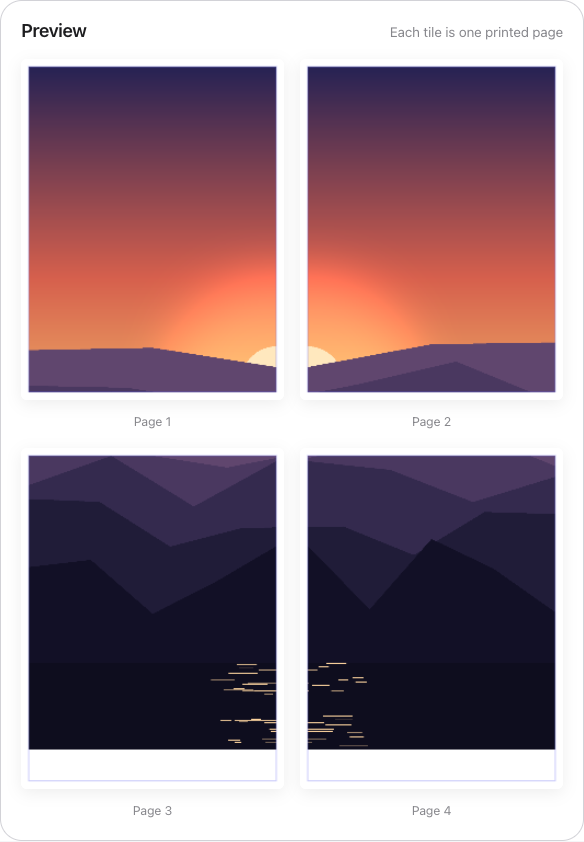
- Check your pixels. Divide image width in pixels by poster width in inches. A 3,600-pixel-wide file printed at 24 inches is 150 DPI — acceptable from a few feet. The splitter shows this live and color-codes it: green at 200+ DPI, amber at 100–199, red below 100.
- Upload and pick a paper size. Letter and A4 cover most printers; Tabloid, Legal, A3, and seven other sizes are there if your hardware takes them. Portrait or landscape, whichever wastes fewer sheets.
- Add overlap. A quarter inch is plenty for a first build. More on why in the next section.
- Print at 100%. Export the multi-page PDF and print at “Actual size.” Fit-to-page silently shrinks every tile a few percent, and nothing lines up afterward.
- Trim and tape. Cut the interior edges, join the sheets with long tape strips on the back.
That is the compressed version. For the printer-dialog settings in detail, see printing a large image on a regular printer; for a click-by-click tour of the splitter itself, the full splitting tutorial covers every control.
The seam objection, answered
This is the question everyone asks before their first tiled poster, so it deserves a straight answer. Two techniques do most of the work.
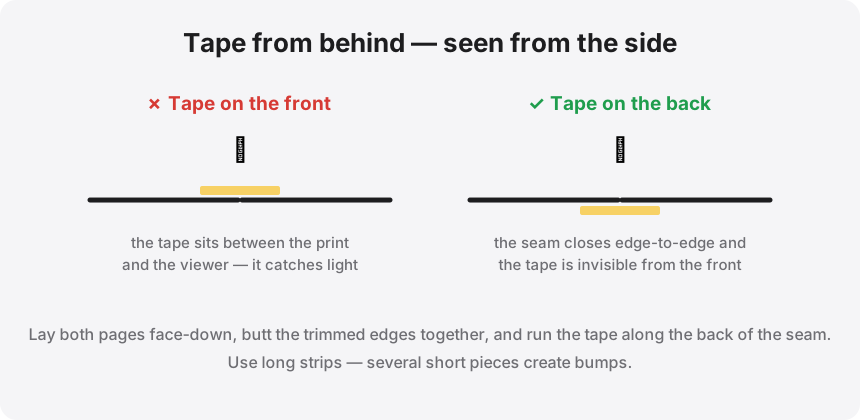
First: tape goes on the back, in long continuous strips, never in short patches on the front. Front tape creates a glossy stripe that catches light exactly the way you fear a seam will. Back tape is invisible and holds better because it spans the whole joint.
Second: use the overlap setting. The splitter can repeat a strip of the image — anywhere from 0 to 2 inches — on both adjacent tiles, and prints cut-line guides inside that strip. You cut through the printed area of the top sheet and lay it over the identical printed area of its neighbor. Any half-millimeter of alignment error hides inside the repeated image instead of opening up as a white gap. Butting bare trimmed edges together, by contrast, demands near-perfect cuts on both sheets at once.
Matte paper helps too: seams on matte stock read as faint lines, while on gloss they read as scratches. There is a separate guide on paper choice if you want the full comparison.
The $2 poster, minus the $2,000 hardware
Upload your image, pick the paper your printer takes, and download a tiled PDF with overlap and cut guides. Everything runs in your browser — the file never leaves your machine.