How to print a banner on a regular printer
Twenty minutes and three sheets of Letter paper. That's the whole budget for the banner below — HAPPY BIRTHDAY! in seven-inch letters, 31.5 inches end to end, hung over a doorway with string and two clothespins. No print shop, no wide-format printer, just a normal inkjet and a glue stick. This guide is that one project, start to finish, with the exact settings I used.
A one-row banner takes three Letter sheets in landscape: set three pages across, print at 100%, and glue the overlaps for a 31.5-inch strip.
On this page
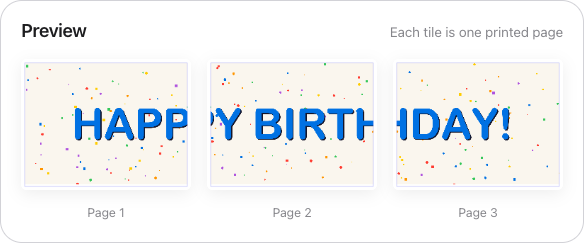
The project: 31.5 × 8 inches on three sheets
A Letter page turned sideways gives you 11 inches of width. Line up three of them and you have 33 raw inches; after margins and a half inch of overlap at each of the two seams, you net right around 31.5 inches of finished banner, roughly 8 inches tall. That spans a standard 30-inch interior doorway with slack on both sides, which is where most birthday banners end up anyway.
The artwork took five minutes in Canva: a custom canvas at 4800 × 1200 pixels, HAPPY BIRTHDAY! in a heavy sans-serif, confetti scattered behind it. Any editor that exports a PNG works the same way. The one design decision that matters at this stage is the canvas ratio — keep it near 4:1 so it maps onto a three-page strip without dead space at either end.
Three settings do all the work
Upload the PNG and change three things from the defaults:
- Orientation: Landscape. This is the step people skip. Portrait pages would produce a shorter banner that's 11 inches tall, with one line of text swimming in empty paper. Landscape turns each tile sideways so the strip runs long and low.
- Set the size by "Pages down", and set it to 1. That locks the split to a single horizontal row — the tool adds columns until the whole design fits. If the banner has to hit an exact length instead (a 36-inch shelf, say), switch the sizing driver to "Width (inches)" and type the number; the page count follows.
- Overlap: 0.5 inches. Banner seams run the full 8-inch height of the strip, and long seams drift when you butt two raw edges together. Overlap repeats a half-inch band of artwork on both neighboring pages and prints a cut line through it, so the glue lands on doubled paper instead of a knife edge.
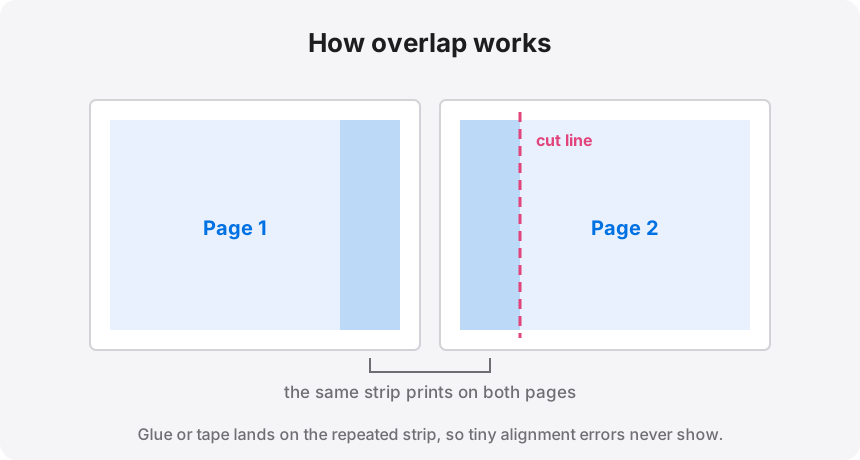
Download the three-page PDF and print at 100% scale. "Fit to page" shrinks every tile by a few percent and the seams stop matching — it's the one printer setting that can sink the whole project.
Banners get away with low DPI — use that
As you adjust the size, the tool shows a live effective-DPI readout: green at 200 DPI and up, amber from 100 to 199, red below 100. For a framed photo you'd hold out for green. For a banner, amber is genuinely fine, and the reason is viewing distance: nobody reads a doorway banner from ten inches away. From six feet — about the closest anyone stands to one — the eye can't tell 110 DPI from 300 on big solid letters. My 4800-pixel design spread across 31.5 inches works out to about 152 DPI, more than the job required. Only worry about the red band if the design includes a photo someone might walk up to.
Size the text for the room, not the screen
Letters need to be at least 4 inches tall to read comfortably from across a room. On an 8-inch-tall banner that means the text should fill at least half the height — and bigger looks better, not worse. The pixel math runs in one direction: pick the finished length in inches, multiply by 150, and that's the canvas width to design at. A 4800 × 1200 pixel file prints 32 inches wide at 150 DPI; a 48-inch banner wants roughly 7200 pixels. Designing small and enlarging later is what puts fuzzy edges on every letter.
Hanging it without wrecking anything
Skip grommets. A three-page paper banner weighs about two ounces, and a grommet kit is overkill by an order of magnitude. What actually works:
- Punched corners and string. One hole punch in each top corner, string through the holes, clothespins to clip the banner to the line. You can re-level it in seconds when one side sags — and one side will.
- Painter's tape loops on the back corners. Releases clean from painted walls; regular tape loops pull paint on the way down.
- Command strips if you printed on cardstock, which gets heavy enough that tape loops eventually give up.
One warning about taking it outside
Paper banners are indoor decorations. A single gust folds one in half, and drizzle finishes it off. If the party moves to the yard and the banner has to come along, laminate each page first — or slide each sheet into a plastic page protector — then tape every seam on both faces. That buys you an afternoon. For anything hanging outdoors longer than a day, order vinyl; that's the one version of this job the home method loses.
Three pages, one seam-ready PDF
Upload your banner art, flip to Landscape, set Pages down to 1 — the split is done before your printer warms up, and the design never leaves your browser.
More weekend-sized print projects
The same tiling trick covers most big-print jobs around the house: