Split an image into 9 pages
Nine pages in a three-by-three grid is the point where a home printout stops looking like paper and starts looking like a poster. On A4 the finished piece measures roughly 630 x 891 mm; on US Letter, about 25 x 33 inches. It is also the point where assembly technique starts to matter more than the split itself, because you now have twelve interior seams instead of two.
A 3 × 3 grid makes roughly a 25 × 33 inch poster on Letter (630 × 891 mm on A4); set three pages across and plan the twelve interior seams.
On this page
What nine pages actually gets you
Three sheets across and three down, printed at full size and joined edge to edge:
- A4 stock: 630 x 891 mm, near enough to A1 (594 x 841 mm) that most people use it as one. Butt-joined without overlap it lands closer to 594 x 855 mm once the unprintable borders come off.
- US Letter stock: 25.5 x 33 inches, which sits neatly between a 24 x 36 poster and a 20 x 30. If you are aiming at a standard 24 x 36 frame, set the size by width in inches instead of by page count and let the grid fall where it falls.
A 3 x 3 is not the only way to get there, and it is worth knowing why you would choose it. A 2 x 4 grid uses eight sheets for a similar area but produces a long, narrow poster. The 3 x 3 keeps the original aspect ratio of most photographs intact, which is usually what people actually want when they say "make it big".
Twelve seams: the part nobody warns you about
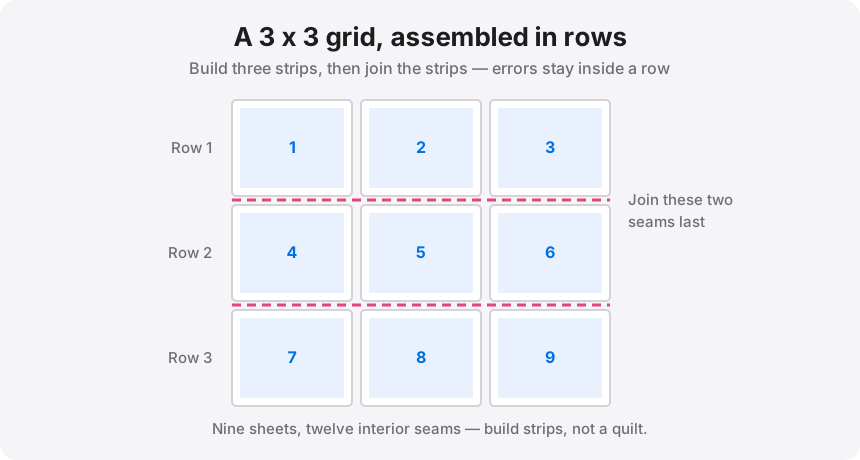
Two sheets have one seam. Four sheets have four. Nine sheets have twelve, and every one is a chance for a 1 mm drift that compounds across the row. Three habits fix almost all of it:
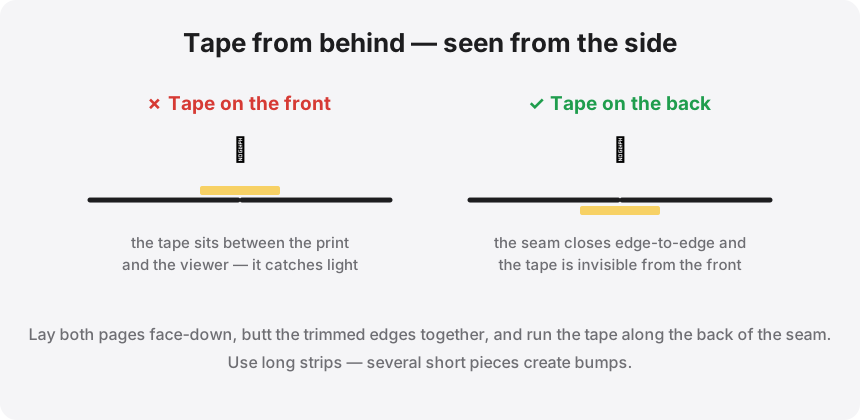
- Use overlap, not butt joints. At this page count, set 0.5 in. Sliding one sheet over its neighbour until the image matches is forgiving; aligning two knife edges nine times is not.
- Build in rows, then join the rows. Assemble the top three sheets into a strip, then the middle three, then the bottom three. Join the three finished strips last. Errors stay inside a row instead of accumulating diagonally across the whole poster.
- Trim only interior edges. Leave the outer margins on every sheet until the entire poster is together. They keep the thing rigid while you work and give you a clean reference to square off at the end.
The split, step by step
- Drop the image or PDF into the splitter. Everything runs locally in your browser.
- Choose your paper — A4 or Letter — and set margins to about 0.25 in.
- Set Pages across: 3. If the source is roughly square, the grid resolves to 3 x 3. If it is a tall portrait, you may get 3 x 4 instead; switch the driver to "Pages down: 3" to force the other axis.
- Set overlap to 0.5 in. At nine sheets this is not optional in my view.
- Leave cut guides on. They print a faint line down the middle of each overlap strip so you know exactly where to trim.
- Export the PDF, print all nine at 100% / Actual size, and lay them out on the floor in grid order before you cut anything.
Resolution: nine pages is where thin files fall apart
At 200 DPI, a 3 x 3 grid on A4 needs a source around 4960 x 7015 px — about 35 megapixels. That is more than most phone cameras produce in a single frame. You have three honest options: accept a lower DPI, shoot or source a larger original, or upscale first.
The built-in upscaler will take an image to 2x or 4x with a sharpening pass, which genuinely helps line art, logos, and AI-generated images. It will not rescue a small, soft photograph — enlarging invents pixels, it does not recover detail. Check the DPI readout before you print nine sheets: amber is fine for something viewed from across a room, red means you will see the softness from anywhere.
Printing nine pages without wasting ink
Print one tile first. Just one — a corner piece. Check the colour, check that it came out at actual size by measuring the printed area with a ruler, and check that your printer is not silently scaling. Two minutes and one sheet spent here has saved me a full set of nine more than once.
Ready to build a 3 x 3?
Load your image, set 3 pages across and half an inch of overlap, and download the nine-page PDF. Nothing leaves your browser.