Split an image into 4 A4 pages
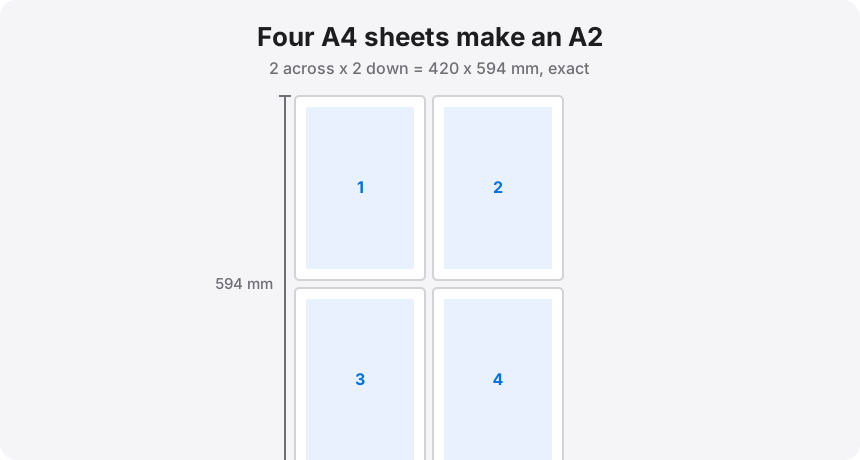
Four A4 sheets arranged two across and two down measure 420 x 594 mm. That is an A2, exactly — no rounding, no leftover strip. It is the most common split people ask for, and the reason is simple: A2 is a real poster size, and four sheets is the largest job most people are willing to tape together in one sitting. Free Image Splitter does the cutting in your browser.
Four A4 sheets two across and two down are exactly A2, so set two pages across on A4 paper.
On this page
Why four A4 sheets land on a real poster size
Every ISO A-size halves into the next one down. A2 is 420 x 594 mm; cut it in half and you get two A3 at 297 x 420; halve those and you get four A4 at 210 x 297. So a 2 x 2 grid of A4 is not an approximation of A2 — it is A2, by construction. That matters when the finished piece has to fit a frame, because A2 frames are cheap and everywhere.
Watch the orientation, because this is where most people go wrong. Four portrait A4 sheets in a 2 x 2 grid give you a portrait A2 (420 wide x 594 tall). If you want a landscape A2, you rotate the whole poster, not the individual sheets — set the tool to 2 pages across and 2 down and let it handle the geometry.
The 6 mm that decides your finished size
Home printers cannot print to the edge. A typical inkjet holds about 6 mm clear on all four sides, so a single A4 sheet gives you roughly 198 x 285 mm of printable area instead of the full 210 x 297. Across a 2 x 2 grid that unprintable border shows up twice in each direction, and you get one of two outcomes depending on what you tell the tool:
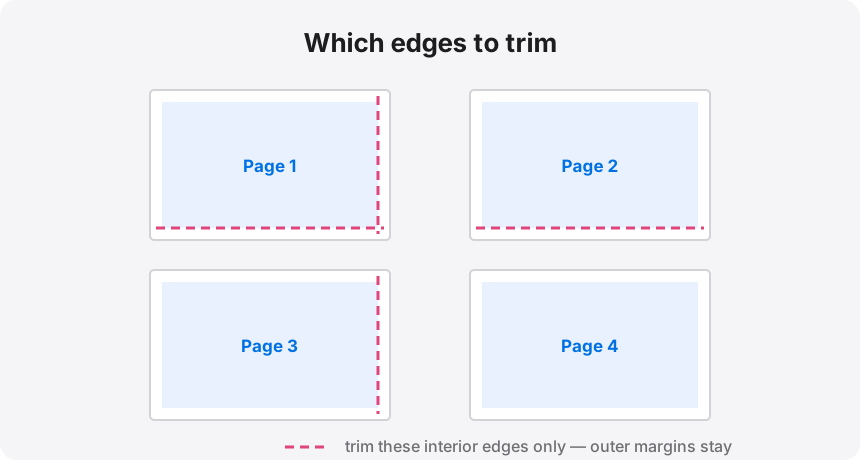
- Butt-joined, slightly under size. Set overlap to 0, trim every interior edge, and push the sheets together. Finished poster: about 396 x 570 mm rather than 420 x 594. That is 94% of A2 — invisible on a wall, obvious in an A2 frame.
- Overlapped, true A2. Set 0.25 to 0.5 in of overlap. The tool repeats a strip of image on each neighbouring tile and prints a cut guide down it. You lay one sheet over the next, slide until the artwork lines up, and tape from behind. The assembled sheet measures a genuine 420 x 594 mm.
My rule is the same as on every other split: butt-join for a pinboard, overlap for a frame. The overlap costs you five extra minutes and buys you the only version that will actually fit.
The split, step by step
- Drop your image or PDF into the splitter. Nothing uploads — the file is read straight into your browser.
- Set paper size to A4 and margins to about 0.25 in (6 mm).
- Set the sizing driver to Pages across: 2. With a portrait source the grid resolves to 2 x 2 on its own; check the readout, which tells you the page count and the finished dimensions before you commit.
- Add 0.25 in of overlap if the poster is going in a frame. Leave it at 0 if you are taping it to a wall.
- Download the multi-page PDF and print all four pages at 100% / Actual size on A4. Never "Fit to page" — it shrinks each tile independently and the seams stop meeting.
Does your file have the pixels for it?
A2 is 16.5 x 23.4 inches. A clean 200 DPI print wants a source of roughly 3300 x 4680 px — a 15-megapixel image. Most phone photos from the last few years clear that. Screenshots and web images usually do not, and no amount of splitting adds detail that was never captured.
You do not have to work this out yourself. The splitter shows a live effective-DPI readout as you change the size: green at 200 and above is crisp in the hand, amber between 100 and 199 reads cleanly from a metre away, red means find a bigger file. Vector PDFs are exempt — they are re-rendered rather than stretched, so they stay sharp at any size.
Four sheets of A4, or two of A3?
If you own an A3 printer, two A3 sheets give you the same A2 with a single seam instead of two. Fewer cuts, fewer chances to misalign, and the join runs across the short dimension where it is easier to hide. Most people reading this do not have an A3 printer, which is exactly why the 2 x 2 A4 split exists — but if you do, take it.
Four sheets of A4 in the tray?
Load your image, set A4 paper and 2 pages across, and download the four-page PDF. The whole split happens in your browser.