How to print an A1 poster on A4 paper
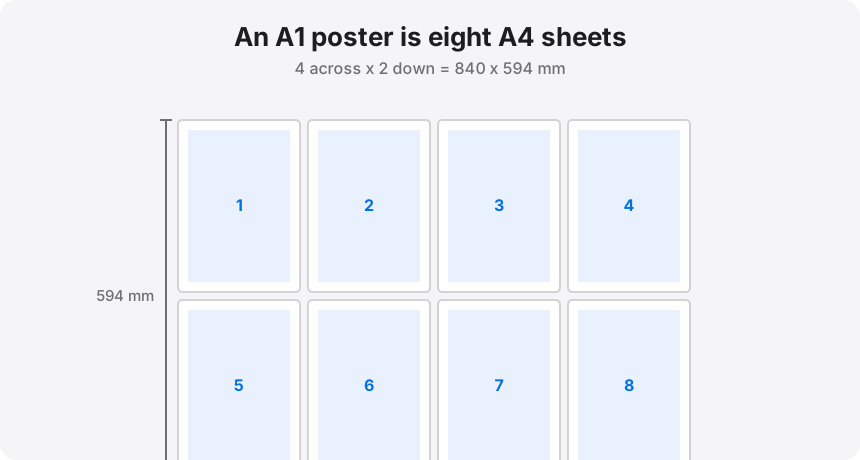
A1 measures 594 x 841 mm. A4 measures 210 x 297 mm. Eight A4 sheets — four across, two down — cover 840 x 594 mm, which is an A1 to within a single millimetre. Like every other step in the ISO series this is designed, not lucky, and it means an A1 poster is really just an eight-page A4 document that has not been cut up yet.
Eight A4 sheets, four across and two down, cover an A1 to within a millimetre; set four pages across on A4 and turn on overlap.
On this page
The layout: four across, two down
Halving works down the whole series. A1 is two A2, four A3, eight A4. In grid terms, a landscape A1 becomes four portrait A4 sheets across by two down: 4 x 210 = 840 mm wide and 2 x 297 = 594 mm tall. A portrait A1 is the same grid rotated — two across by four down.
This is the largest split most people should attempt on a home printer, and the reason is not the printing. It is that eight sheets produce ten interior seams, and a poster this size gets handled, rolled, and mounted, all of which stress every joint you made.
Overlap is mandatory at this size
On a two-sheet split you can get away with butt joints. On eight you cannot. Set 0.5 in of overlap and let the tool repeat a strip of image on each neighbouring tile. Two reasons this matters more as the poster grows:
- Error compounds along a row. A half-millimetre misalignment on the first seam is invisible. The same error repeated across four sheets puts the far edge two millimetres out of true, and that is visible on a straight line running through the artwork.
- Overlapped joins are stronger. A butt joint is held together by tape alone. An overlapped joint has paper bonded to paper across a 12 mm band, which survives rolling and mounting far better.
The cost is size: overlap consumes image area, so the finished poster comes out slightly under a true A1 unless you set the size by width instead of by page count. If exact A1 matters — for a frame, or a competition entry — set the driver to Width (inches) and enter 23.4, then let the tool decide how many sheets it needs.
The split, step by step
- Drop the A1 artwork into the splitter. Vector PDFs are ideal here; they re-render at print resolution instead of stretching.
- Set paper to A4, margins to 0.25 in, and quality to Best (300 dpi) — at this size the file is large either way, and you may as well have the detail.
- Set Pages across: 4 for a landscape A1, or Pages down: 4 for portrait. Confirm the readout says eight pages before you export.
- Set overlap to 0.5 in and leave cut guides on.
- Export the eight-page PDF. Print at 100% / Actual size on A4, and print all eight in one run so paper and ink stay consistent — colour drifts between cartridges and even between sessions.
Assembling something this big without wrecking it
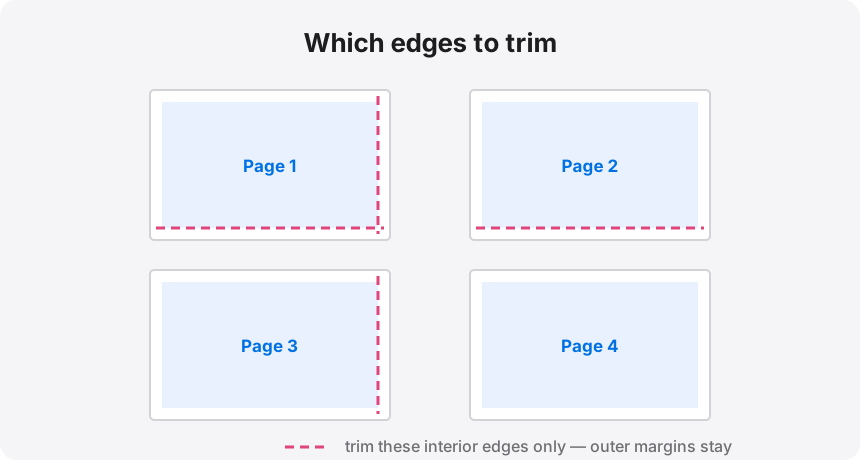
Clear a table bigger than the poster, or work on the floor. Assemble in rows first — join the top four sheets into a strip, then the bottom four — and join the two strips last, in a single long seam. That one long seam is easier to get straight than four short ones stacked vertically.
Tape from behind with one continuous strip per seam rather than a series of short pieces, which show as ridges under angled light. If the poster is going on a wall permanently, mount it to foam board while it is flat; an A1 sheet of taped paper will not stay flat on its own.
Resolution: be honest before you spend eight sheets
A1 is 23.4 x 33.1 inches. At 200 DPI that wants roughly 4680 x 6620 px; at 300 DPI, about 7020 x 9930 px. Very few photographs are that large natively. In practice:
- Vector artwork or a PDF export from design software — no problem at any size.
- A modern full-frame or high-end phone photo — fine at 150 to 200 DPI, which is genuinely sharp for something viewed from more than a metre away, and an A1 poster always is.
- A web image or screenshot — do not. Eight sheets of visible pixelation is an expensive lesson. Run it through the upscaler first and check the DPI readout, or pick a smaller finished size.
If you have an A3 printer
Four A3 sheets in a 2 x 2 grid also make an A1, with four seams instead of ten. If A3 is available to you, take it every time — fewer joints is always the better poster.
Eight sheets and a roll of tape
Load the artwork, set A4 paper and 4 pages across, and download the eight-page PDF. The split runs in your browser.