How to print an A2 poster on A3 paper
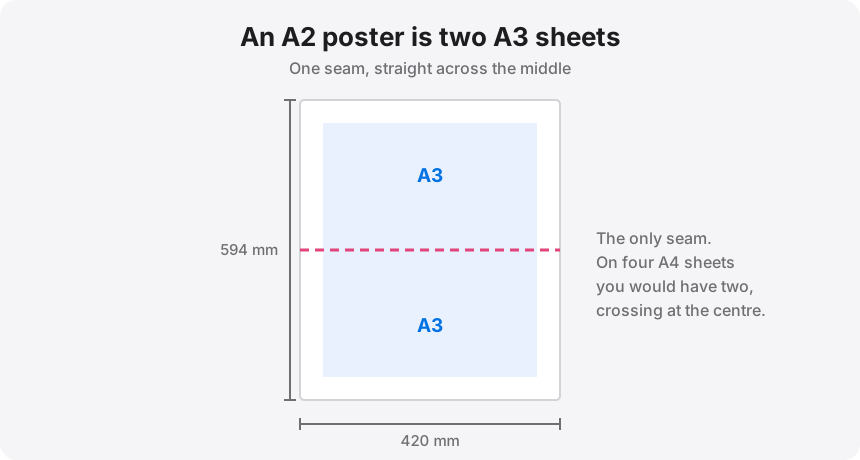
A2 is 420 x 594 mm. Two A3 sheets stacked along their long edges give 420 x 594 mm exactly. One seam, two sheets, five minutes of assembly — it is the cleanest large-poster split there is, and if you have an A3 printer it is the one to use. If you only have A4, the same poster takes four sheets and two seams instead.
Two A3 sheets stacked along their long edges are exactly A2, so an A2 poster is one seam on A3 or four sheets and two seams on A4.
On this page
Two A3, or four A4
Both are exact. Neither involves rounding. The choice is entirely about how many seams you are willing to live with:
- Two A3 sheets. One seam, running across the middle of the poster. Fewest cuts, fastest assembly, and the join sits on a single straight line that is easy to keep true. Needs an A3-capable printer.
- Four A4 sheets in a 2 x 2 grid. Two seams meeting in a cross at the centre. Works on any printer. The centre point is the fiddliest part of the job, because four corners have to agree with each other.
If you have both options, take the A3 split. A seam through the middle of a poster is unavoidable either way; one seam is simply better than two, and a cross-join in the dead centre of an image is the most visible place a misalignment can land.
Where the seam falls, and why you should care
On the two-A3 split the seam runs horizontally through the middle of a portrait A2. That is often straight through the focal point of the image — a face, a horizon, the middle of a headline. You cannot move the seam, but you can choose which way the poster is oriented before you split, and on a design you control you can nudge the artwork so the join lands in a quiet area.
This is worth thirty seconds of thought before you print. A seam through flat colour or sky disappears completely. A seam through an eye does not.
The A3 split, step by step
- Drop the A2 artwork into the splitter. It stays in your browser.
- Set paper size to A3 and margins to about 0.25 in (6 mm).
- Set Pages down: 2 for a portrait A2, or Pages across: 2 for landscape. The readout should say two pages and roughly 420 x 594 mm.
- Add 0.25 in of overlap if the poster needs to be a true A2 for a frame. Leave it at 0 for a butt join, which finishes at about 94% size.
- Print both pages at 100% / Actual size with the print dialog's paper set to A3. Not "fit", not "shrink to printable area".
The A4 version
Same file, different paper. Set paper to A4 and 2 pages across; a portrait A2 resolves to a 2 x 2 grid of four sheets. Add 0.25 to 0.5 in of overlap — with a cross-join at the centre, the extra forgiveness is worth the small loss of area.
Assemble it as two halves rather than four quarters: join the top pair into a strip, join the bottom pair into a strip, then bring the two strips together along one long seam. Trying to align four sheets simultaneously at the centre point is how people end up with a visible offset.
Resolution for A2
A2 is 16.5 x 23.4 inches. At 200 DPI that means a source of roughly 3300 x 4680 px, which a good phone photo or any competent camera file will clear. At 300 DPI you want about 4960 x 7020 px, which is really design-software or vector territory. The splitter's live DPI readout tells you which band you are in before you commit paper to it.
Do not mix paper sizes
Every tile in one poster should come off the same stock. Mixing A3 and A4 sheets, or A4 and US Letter, changes the printable area between tiles and the seams stop lining up — usually by a few millimetres that grow as you work across the poster. If you run out of paper halfway through, finish the run on the same stock rather than switching.
Two sheets of A3 and one seam
Load the A2 artwork, set A3 paper and 2 pages down, and download the two-page PDF. Everything happens in your browser.